Mac pointer colors · Free app
Your Mac pointer,
impossible to lose.
Try outline and fill color pairs on a live macOS desktop, copy the hex codes, or apply one in a click with the free menu-bar app.
- 47
- color pairs
- 4
- test backgrounds
- 1
- click to apply
Pointer
The outline is what you’ll spot first on busy screens; the fill decides how the pointer feels against white pages and dark apps.
Add to Pointer Colors for Mac Opens the Mac app, if it's installed.
Pointer Colors for Mac · Free
Your pointer,
one click away.
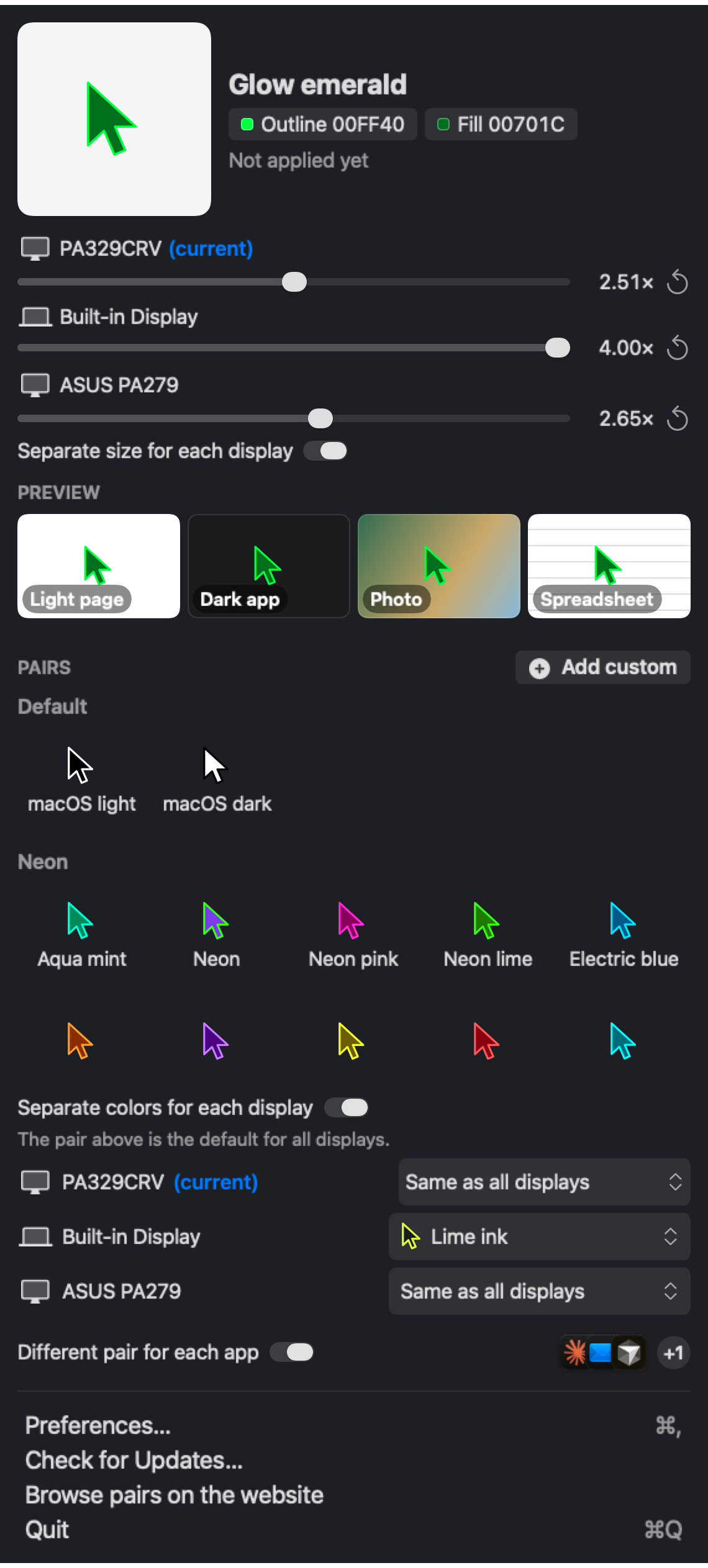
A menu-bar app that applies any pair instantly. No hex codes, no digging through System Settings.
- 01Every pair on this page, plus your own
- 02A separate color and size for each display, and a pair for each app
- 03Switches pairs with light and dark appearance
- 04Keyboard shortcuts, contrast warnings, English and Arabic
macOS 14 or later. The app is not notarized yet, so the first time, right-click it and choose Open, allow it in System Settings › Privacy & Security, or run this in Terminal:
xattr -cr "/Applications/Pointer Colors.app"
Questions
How do I change the mouse pointer color on a Mac?
Open System Settings › Accessibility › Display, scroll to Pointer, and set Pointer outline color and Pointer fill color with the hex codes from this page. Or use the free Pointer Colors app to apply a pair in one click.
How do I make the cursor bigger on macOS?
Drag Pointer size in System Settings › Accessibility › Display, or use the size slider in Pointer Colors, which can also set a different size on each display.
How do I reset the pointer to black and white?
Click Reset Colors under Pointer in System Settings › Accessibility › Display, or pick the macOS light or macOS dark pair on this page or in the app.
Which pointer colors are easiest to see?
Pick a pair where the outline or the fill stands out on both white pages and dark apps. Check it on the four preview tiles; the app also warns when a pair is hard to see.
Why does the app ask for Full Disk Access?
macOS keeps the pointer color and size settings in a protected Accessibility preferences file. Apps from outside the App Store can only change that file with Full Disk Access. Pointer Colors first tries Apple's own defaults tool, which usually works without it, and only asks when macOS blocks both. It only touches the pointer color, size and shake-to-find settings, reads no other files, and sends nothing anywhere.
Is Pointer Colors free?
Yes. The website and the Mac app are free and open source on GitHub. The app only changes the pointer settings macOS already has.